The BudStacks Guide · Part 18
Data Processors
Who processes your customers' data on your behalf — transparency, built in.
In your admin: /tenant-admin/legal/subprocessors
The register
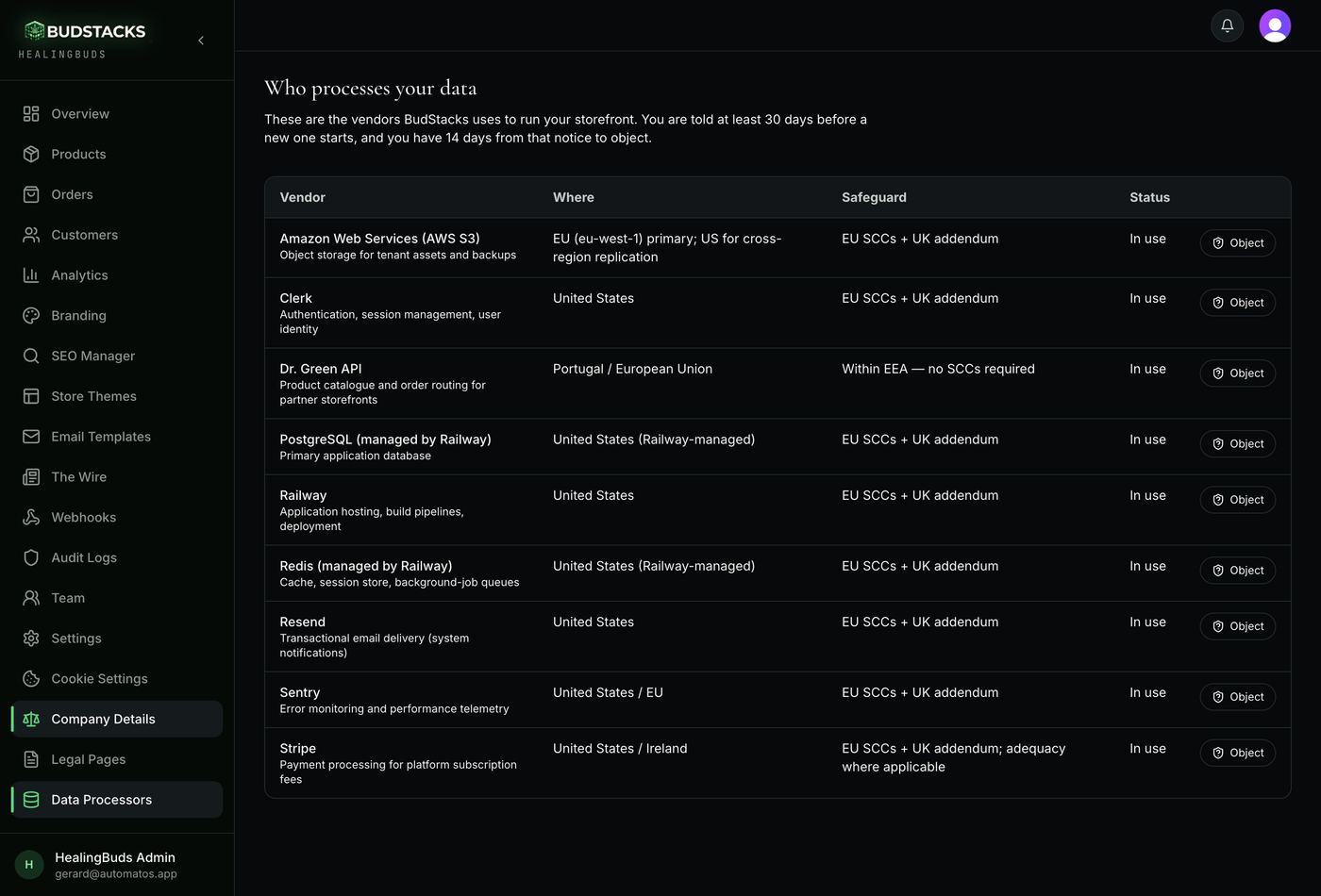
What it’s for
Running a storefront means other companies touch your customers' data — the servers it runs on, the mail that sends your order confirmations, the payment provider. This page names all of them, and it is maintained for you.
What it does
- Vendor names the company and, underneath, what it actually does for your store.
- Where is the region the processing happens in.
- Safeguard is the legal mechanism covering any transfer out of your region.
- Status reads In use, or names the date a vendor is due to start.
- Nothing here is yours to fill in. These are the vendors the platform itself runs on, so BudStacks maintains one register for every store.
- The same register is published openly at budstacks.io/legal/subprocessors.
Why you’ll use it
Your own privacy notice has to tell customers who handles their data. This is that answer, kept current without you chasing it — and it is a list most platforms will only give you if you ask, on a legal page you have to go looking for.
- · Retired vendors drop off the list. What you see is what is in use or about to be.
- · This page needs the Edit settings permission — team members without it will not see it in the menu.
Advance notice of changes
What it’s for
You are told before a new vendor starts processing anything, not after. The notice comes to you by email; this page is the standing record of the same thing.
What it does
- New vendors get at least 30 days' notice before they may begin processing.
- A pending vendor appears on the page with an amber panel above the table counting the upcoming changes, and a status reading “From” its start date.
- The email names the vendor, what it does, where it is, the safeguard, the start date, and the date your objection is due — as a date, so nobody has to do arithmetic.
- Every active store is emailed. There is no list to subscribe to, deliberately: notice you have to opt into is not notice.
- A vendor that was never announced never starts, whatever its date says.
Why you’ll use it
The right to know is only worth something if the news reaches you. Thirty days is enough time to read the entry, ask a question, or object — before anything has moved.
- · The notice goes to one address per store: your account's admin email. If that mailbox is not watched closely, this page is the backstop — the same information, always current.
- · A pending vendor is not processing anything yet. Nothing is happening to your customers' data until the start date shown.
Objecting to a vendor
What it’s for
If a change does not work for you — a region your own client contract forbids, a vendor you have a history with — the Object button on that row records it against that specific vendor.
What it does
- Object opens a short form asking why. A few words are the minimum; write enough that we can act on it.
- Your objection is recorded against that vendor, with who raised it and when, and we respond before the change takes effect.
- You have 14 days from the announcement to object — that is the window in the Data Processing Agreement, and it runs inside the 30 days' notice.
- Later objections are still accepted, never refused. They are flagged “raised late”, and you are told plainly that a response before the start date cannot be guaranteed.
- Everything you have raised appears on this page under Your objections — vendor, date, status and your reason — so nothing depends on remembering an email thread.
- The Object button sits on every row, including vendors already in use.
Try it: Raise an objection
- Open Data Processors. If there is an amber panel at the top, read it — it counts the changes that have not started yet.
- Find the vendor in the table and check its Where and Safeguard columns against whatever obligation is troubling you.
- Press Object on that row.The Submit button stays greyed out until you have written a real reason — a bare “no” is not something anyone can respond to.
- Say what the problem is, concretely. “Our own agreement with a client prohibits processing outside the EEA” is the kind of thing that can be acted on.
- Press Submit objection.You should see a confirmation, and your objection appear under Your objections with a status of open. If you are past the 14-day window it is still recorded, and the message says so.
Why you’ll use it
A right you can only exercise by finding an email address at the bottom of a legal page is barely a right. Here it is a button, the record is kept against the vendor, and “we never received it” is not a position anyone can take.
- · An objection does not by itself stop a vendor being used. It obliges a response before the change takes effect, and it puts your position on the record.
- · Objections are recorded in Audit Logs alongside your other account activity.
- · Progress on an objection comes back to you by email or from your account contact; the page shows the status held against it, not a conversation.