The BudStacks Guide · Part 16
Company Details
The legal identity behind your store — what appears in your privacy notice.
In your admin: /tenant-admin/legal
Why your company has to be named
What it’s for
Your storefront needs a privacy notice that names your company. You are the data controller for your customers' information — the person legally answerable for it — so the notice has to be yours, not ours.
What it does
- You supply the facts about your business. BudStacks supplies the document those facts are merged into.
- The same details feed all four of your legal pages: privacy, terms of sale, cookie notice and regulatory information.
- The wording of the documents is not editable here. One document, reviewed once, inherited by every store — which is why it stays maintained.
- Until you publish, all four of your legal pages tell visitors the document is unavailable and point them at you.
Why you’ll use it
Customers and regulators both look for a real, accountable business behind a shop. This is the ten minutes that turns a storefront into one that names its owner, states an address, and gives someone a way to ask about their data.
- · This page needs the Edit settings permission — team members without it will not see it in the menu.
- · Every save is recorded in Audit Logs, including whether it was a publish and which version of the wording you published.
The details you fill in
What it’s for
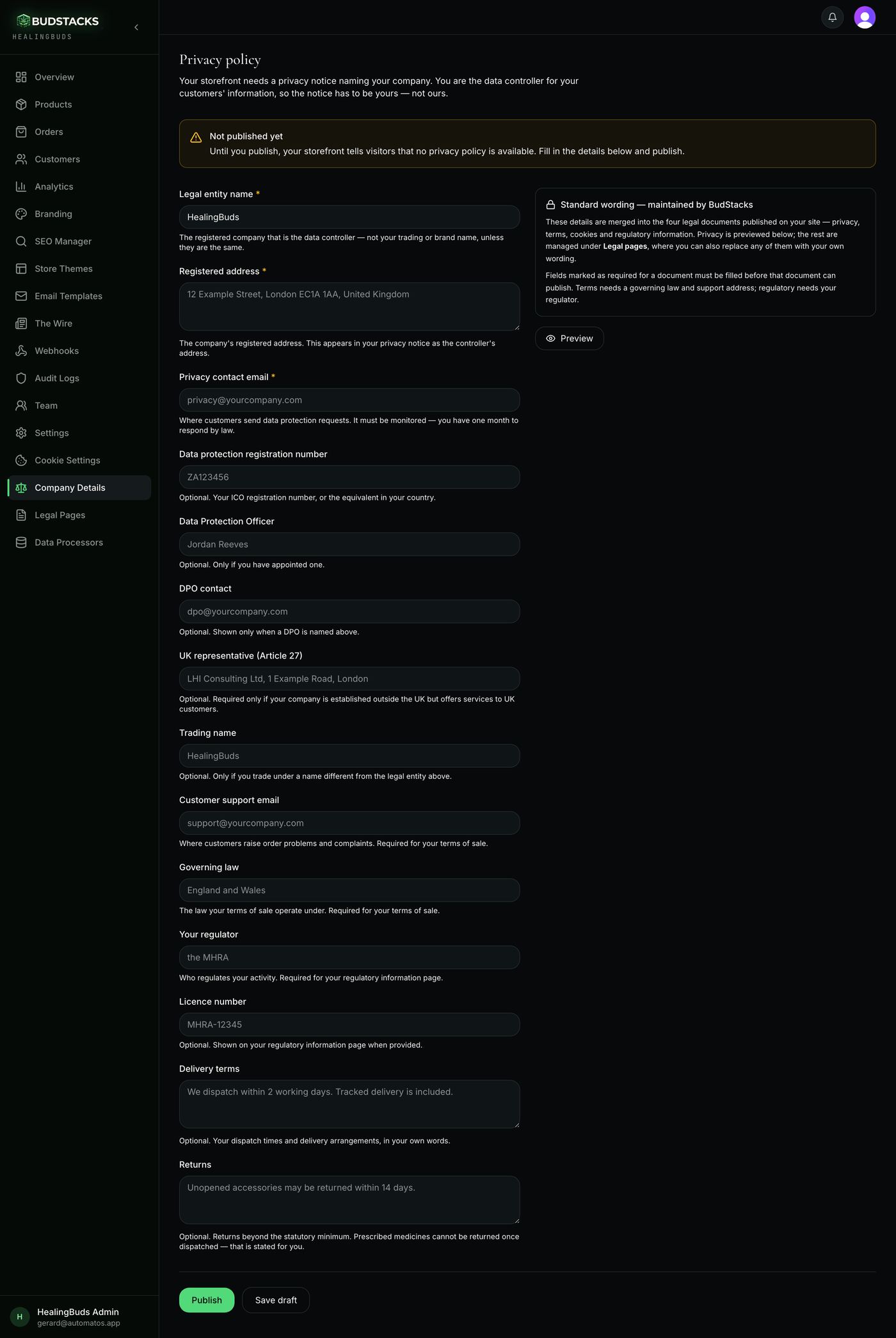
Fourteen fields, each with a line of help underneath explaining exactly what belongs in it. Three are required; the rest are optional here but may be required by one of the other legal pages.
What it does
- Legal entity name, Registered address and Privacy contact email are required — marked with an amber star.
- The first two are pre-filled from your trading details as a starting point, and you are expected to correct them. The registered company and its registered address are frequently not the shop name and shop address.
- Data protection registration number, Data Protection Officer, DPO contact and UK representative are optional. Leave them blank when they do not apply — a blank field simply drops that sentence from the notice.
- Trading name is for stores that trade under a different name from the registered company.
- Customer support email and Governing law are what your terms of sale need.
- Your regulator is what the regulatory information page needs. Licence number is optional and appears on that page when you provide it.
- Delivery terms and Returns are free text in your own words, and appear in your terms of sale.
- Preview builds the full privacy notice with your details merged in, without saving or publishing anything.
Try it: Fill it in once and publish
- Open Company Details. The first two fields are already filled from your store's trading details — read them properly rather than trusting them.What belongs here is the registered legal entity, not the brand above the shop door. If they are genuinely the same, leave them.
- Complete the three starred fields: Legal entity name, Registered address, Privacy contact email.The privacy contact has to be a mailbox somebody watches — the law gives you one month to answer a customer's data request.
- While you are here, fill in Customer support email, Governing law and Your regulator.They are optional on this page but required elsewhere: terms of sale needs the support email and governing law, regulatory information needs your regulator. Filling them now saves a second visit.
- Press Preview.You should see your privacy notice render on the right, opening with “This website is operated by” and your company name — where the platform's name used to appear.
- Press Publish.The amber “Not published yet” banner should turn green and name the address your notice is served at. Open that link and read the live page.
- Change a detail later? Edit it and press Republish. Save draft keeps your typing without touching your storefront.
Why you’ll use it
No drafting, no lawyer, no blank page. You are answering questions about your own business, and a complete legal document comes out of the other side.
- · The three required fields are checked on every save, not just on publish — Save draft will refuse a half-finished form and tell you which field it wants. Fill those three first, then use drafts for the rest.
- · Delivery terms and Returns keep your line breaks. Everything else is collapsed onto one line when it is merged into the document.
- · Prescribed medicines cannot be returned once dispatched. That is stated for you in the terms — the Returns field is for anything you offer beyond the statutory minimum.
Publishing and versions
What it’s for
The banner at the top of the page is the honest answer to “is my privacy notice actually live?” — and it is the same answer your storefront gives visitors.
What it does
- Amber, “Not published yet”: nothing is live, and your storefront is telling visitors so.
- Green, “Published and live”: your notice is being served, with a link straight to it on your own domain.
- The green banner also warns you when BudStacks has updated the standard wording since you published: it names the version you are on and the version now available, and asks you to republish to adopt it.
- Publishing stamps the version in force at that moment, so it is always possible to say precisely which text you published.
Why you’ll use it
Legal wording moves, and keeping up with it is not your job. The version note is the whole arrangement in one line: we maintain the document, you press Republish when it changes.
- · The “Last updated” date customers see on the live page is not set here — it comes from when that document was first published under Legal Pages, and republishing does not move it.
- · Publishing your company details does not publish the other three legal pages. Each of those is published separately under Legal Pages (Part 17), which is also where you can replace any of them with your own wording.